eSign Document with Form Field Signature Leave feedback
On this page
A form field is an interactive element located on a document page that allows user data input through various control types like free input text boxes, multi-line text boxes, checkboxes, drop-down lists, etc. Different document types support a specific list of form field types. These elements are used to collect information from users on template form. Each Form Field element has a unique name, settings and value field. Form Fields should have unique names within the form. The picture below demonstrates a possible document page with form fields.
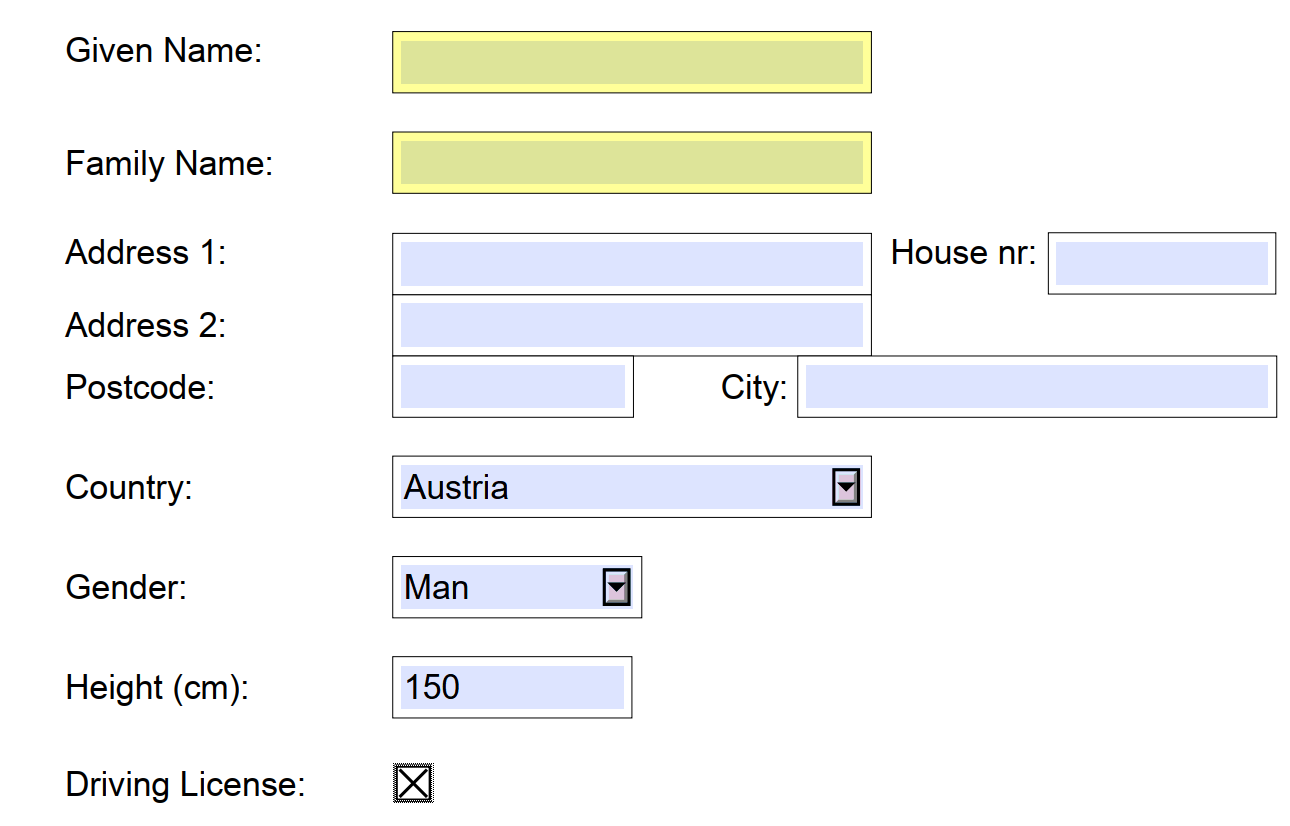
With GroupDocs.Signature for Python via .NET you can create new form fields or update the existing ones within the documents. The FormFieldSignOptions class specifies different options for Form Field signature. The FormFieldSignOptions class contains one FormFieldSignature object that specifies the properties of the desired signature.
Below are listed different Form Field signature classes that could be set to FormFieldSignOptions:
- TextFormFieldSignature - represents a text input form field on a document page.
- CheckboxFormFieldSignature - represents a checkbox field on a document page.
- ComboboxFormFieldSignature - represents a combo box field signature input with a list of possible options.
- RadioButtonFormFieldSignature - represents a radio button signature on a document page.
- DigitalFormFieldSignature - represents a digital signature input form on a document page.
Here are the steps to add Form Field signatures into a document with GroupDocs.Signature:
- Create a new instance of the Signature class and pass the source document path as a constructor parameter;
- Instantiate the FormFieldSignOptions object according to your requirements;
- Instantiate one of the objects - TextFormFieldSignature, CheckboxFormFieldSignature, ComboboxFormFieldSignature, RadioButtonFormFieldSignature or DigitalFormFieldSignature;
- Assign the FormFieldSignOptions property with the object created in a previous step;
- Call the Sign method of the Signature class instance and pass the FormFieldSignOptions object to it.
NoteCurrently GroupDocs.Signature supports the creation of Form Field signatures for PDF documents only.
This example shows how to sign a PDF document with a Form Field electronic signature using Python:
from groupdocs.signature import Signature
from groupdocs.signature.options import FormFieldSignOptions
from groupdocs.signature.domain import TextFormFieldSignature


def sign_with_form_field_signature():
    with Signature("sample.pdf") as signature:
        # Create a text form field named "FieldText" with the value "Value1"
        text_field = TextFormFieldSignature("FieldText", "Value1")

        # Create form field options for it
        options = FormFieldSignOptions(text_field)

        # Set form field position and size
        options.left = 100
        options.top = 400
        options.width = 200
        options.height = 20

        # Sign the document and save the result
        result = signature.sign("signed_form_field.pdf", options)
        for field in result.succeeded:
            print(f"Added form field '{field.name}' with value '{field.value}'")


if __name__ == "__main__":
    sign_with_form_field_signature()
sample.pdf is the sample file used in this example. Click here to download it.
Binary file (PDF, 37 KB)
GroupDocs.Signature for Python via .NET also provides a mechanism to update the existing form field signatures within the documents.
To update an existing form field signature within the document with GroupDocs.Signature:
- Create a new instance of the Signature class and pass the source document path as a constructor parameter.
- Instantiate the TextSignOptions object with all required additional options.
- Set the TextSignOptions.signature_implementation property with the TextSignatureImplementation.FORM_FIELD value.
- Set the form_text_field_title and form_text_field_type properties with the proper values of form fields to be updated.
- Call the Sign method of the Signature class instance and pass the initialized TextSignOptions instance to it.
- Analyze the SignResult object to check the newly created signatures if needed.
This example shows how to sign a PDF document with the existing Form Field electronic signature and update its value using Python. The sample_form.pdf form has two text fields: ApprovalNote (plain text) and UserSignatureFullName (rich text). The form_text_field_title property names the field to fill; when it is not set, the text goes into every text field of the given form_text_field_type.
from groupdocs.signature import Signature
from groupdocs.signature.options import TextSignOptions
from groupdocs.signature.domain import FormTextFieldType, TextSignatureImplementation


def fill_existing_form_fields():
    with Signature("sample_form.pdf") as signature:
        # Put a note into the plain-text field "ApprovalNote"
        note_options = TextSignOptions("Document is approved")
        note_options.signature_implementation = TextSignatureImplementation.FORM_FIELD
        note_options.form_text_field_type = FormTextFieldType.PLAIN_TEXT
        note_options.form_text_field_title = "ApprovalNote"

        # Put the signer's name into the rich-text field "UserSignatureFullName"
        name_options = TextSignOptions("John Smith")
        name_options.signature_implementation = TextSignatureImplementation.FORM_FIELD
        name_options.form_text_field_type = FormTextFieldType.RICH_TEXT
        name_options.form_text_field_title = "UserSignatureFullName"

        # Sign the document with both options at once
        result = signature.sign("filled_form.pdf", [note_options, name_options])
        print(f"Filled {len(result.succeeded)} form field(s)")


if __name__ == "__main__":
    fill_existing_form_fields()
sample_form.pdf is the sample file used in this example. Click here to download it.
Binary file (PDF, 40 KB)
This guide explains how to use GroupDocs.Signature for Python via .NET to add form field signatures to documents. It covers loading a document, configuring form field properties such as name, type, and value, and saving the signed document. Advanced options, like placing the field on the page and filling the existing fields of a PDF form, are also included. For more details, refer to related guides on document signing techniques.
You may easily run the code above and see the feature in action in our GitHub examples:
Along with the full-featured Python library, we provide simple but powerful free online apps.
To sign PDF documents for free, you can use the Digital Signature - PDF online application.
To sign Word, Excel, PowerPoint, and other documents you can use the other online apps from the GroupDocs.Signature App Product Family.
Was this page helpful?
Any additional feedback you'd like to share with us?
Please tell us how we can improve this page.
Thank you for your feedback!
We value your opinion. Your feedback will help us improve our documentation.


