How to sign Excel spreadsheets and their macros using Java Leave feedback
On this page
You can sign spreadsheets, as well as, Visual Basic for Applications (VBA) macro embedded into spreadsheets with digital certificates. Signing a workbook confirms the identity of the signer and the validity of the content. This enhances security and authentication. Modifying a signed spreadsheet invalidates the signature. When opening a signed workbook, other users could be sure that it came from a reliable source and no one has modified it since.
A digital certificate is a cryptographic key pair that consists of a public key and a private key, issued by a trusted third party known as a Certificate Authority (CA). There are many commercial third-party certificate authorities from which you can either purchase a digital certificate or obtain a free digital certificate. Many institutions, governments, and corporations can also issue their own certificates.
You can create your own digital certificate for personal use or testing purposes with the SelfCert.exe tool that is provided with Microsoft Office, or with the keytool utility of the JDK (keytool -genkeypair -keyalg RSA -storetype PKCS12 ...). However, such a certificate is not authenticated by a Certificate Authority (CA).
In this article, we will use a self-created test certificate.
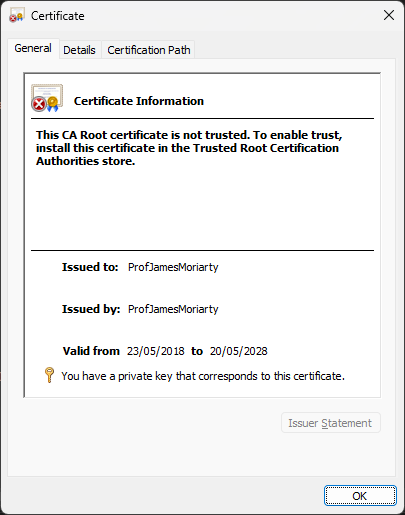
Keep in mind that for production environments, you should obtain a certificate from a trusted CA to ensure secure and trusted communication.
You can sign the following files and projects:
- workbooks (XLSX),
- templates (XLTX),
- macro-enabled workbooks (XLSM),
- macro-enabled templates (XLTM),
- VBA macro projects within workbooks or templates.
To sign the content of a particular spreadsheet or template:
- Instantiate the Signature class providing a path to the source document or document stream.
- Create the DigitalSignOptions object instance providing a path to the certificate. Specify the certificate password using the
setPasswordmethod. - Invoke the
signmethod to process the document, providing the output file path and sign options.
import com.groupdocs.signature.Signature;
import com.groupdocs.signature.options.sign.DigitalSignOptions;

import java.io.File;

String filePath = "C:\\sample.xlsx"; // NOTE: Put here actual path for your document and certificate
String certificatePath = "C:\\MrSmithSignature.pfx";
String password = "1234567890";
String fileName = new File(filePath).getName();
String outputFilePath = new File("C:\\output", fileName).getPath();

// Sign a spreadsheet
Signature signature = new Signature(filePath);
try {
    // Setup digital signature options
    DigitalSignOptions signOptions = new DigitalSignOptions(certificatePath);
    signOptions.getSignature().setComments("Test Signature");
    signOptions.setPassword(password);

    signature.sign(outputFilePath, signOptions);
} finally {
    signature.dispose();
}
A spreadsheet signed with a digital certificate would look like below:
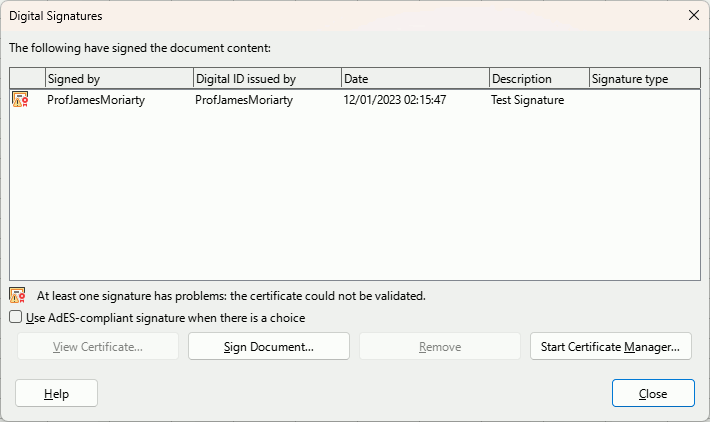
You can sign just the macros embedded into the spreadsheet, or sign both the spreadsheet’s content and macros.
To sign only the macros:
- Instantiate the Signature class providing a path to the source document or document stream.
- Create the DigitalSignOptions object instance.
- Create the DigitalVBA object instance providing certificate path and password as constructor parameters.
- Call
setSignOnlyVBAProject(true). - Add the
DigitalVBAobject instance to the list returned by thegetExtensionsmethod of the sign options. - Invoke the
signmethod to process the document, providing the output file path and sign options.
import com.groupdocs.signature.Signature;
import com.groupdocs.signature.domain.extensions.signoptions.DigitalVBA;
import com.groupdocs.signature.options.sign.DigitalSignOptions;

import java.io.File;

String filePath = "C:\\sample.xlsm"; // NOTE: Put here actual path for your document and certificate
String certificatePath = "C:\\MrSmithSignature.pfx";
String password = "1234567890";
String fileName = new File(filePath).getName();
String outputFilePath = new File("C:\\output", fileName).getPath();

// Sign macros within the spreadsheet
Signature signature = new Signature(filePath);
try {
    // Create digital signature options without digital certificate
    DigitalSignOptions signOptions = new DigitalSignOptions();
    // Add extension for signing VBA project digitally
    DigitalVBA digitalVBA = new DigitalVBA(certificatePath, password);
    // Set to true only for signing VBA project
    digitalVBA.setSignOnlyVBAProject(true);
    digitalVBA.setComments("Signed VBA macros");
    signOptions.getExtensions().add(digitalVBA);

    signature.sign(outputFilePath, signOptions);
} finally {
    signature.dispose();
}
To sign both the content and macros:
- Instantiate the Signature class providing a path to the source document or document stream.
- Create the DigitalSignOptions object instance providing a path to the certificate. Specify the certificate password using the
setPasswordmethod. - Create the DigitalVBA object instance providing certificate path and password as constructor parameters.
- Do not call
setSignOnlyVBAProject, or passfalseto it. - Add the
DigitalVBAobject instance to the list returned by thegetExtensionsmethod of the sign options. - Invoke the
signmethod to process the document, providing the output file path and sign options.
import com.groupdocs.signature.Signature;
import com.groupdocs.signature.domain.extensions.signoptions.DigitalVBA;
import com.groupdocs.signature.options.sign.DigitalSignOptions;

import java.io.File;

String filePath = "C:\\sample.xlsm"; // NOTE: Put here actual path for your document and certificate
String certificatePath = "C:\\MrSmithSignature.pfx";
String password = "1234567890";
String fileName = new File(filePath).getName();
String outputFilePath = new File("C:\\output", fileName).getPath();

// Sign the spreadsheet content and its macros
Signature signature = new Signature(filePath);
try {
    // Setup digital signature options
    DigitalSignOptions signOptions = new DigitalSignOptions(certificatePath);
    signOptions.getSignature().setComments("Test Signature");
    signOptions.setPassword(password);

    // Add extension for signing VBA project digitally
    DigitalVBA digitalVBA = new DigitalVBA(certificatePath, password);
    digitalVBA.setComments("Signed VBA macros");
    signOptions.getExtensions().add(digitalVBA);

    signature.sign(outputFilePath, signOptions);
} finally {
    signature.dispose();
}
See also Sign VBA macros with Digital signature.
In order to use the API without evaluation limitations, you can get a free temporary license.
In this article, we learned the reasons for signing Excel spreadsheets and macros embedded into them. Using GroupDocs.Signature in Java applications significantly enhances the efficiency of these tasks. In addition, you can use the Digital Signature - XLSX online application to sign your Excel files with GroupDocs.Signature for free.
Read the documentation to learn how to use GroupDocs.Signature in your Java applications. Also, you may discuss any questions or issues at the GroupDocs forum.
Was this page helpful?
Any additional feedback you'd like to share with us?
Please tell us how we can improve this page.
Thank you for your feedback!
We value your opinion. Your feedback will help us improve our documentation.


