Index lifecycle Leave feedback
The life cycle of an index begins at the moment of creating an instance of the Index class and first saving the index files to disk. The index life cycle ends when a folder containing index files is deleted. Below is a diagram of the recommended sequence of index life cycle states.
The states described on this page (Empty, Actual, Optimized and Outdated) are conceptual states of the index content relative to the indexed documents. They are not values of the IndexStatus enumeration, which describes the operation that the index is currently performing (for example, Ready or Indexing).
Please note that the index life cycle does not consider the events of loading and unloading the index from RAM. At each stage of existence, the index can be loaded and unloaded from memory several times.
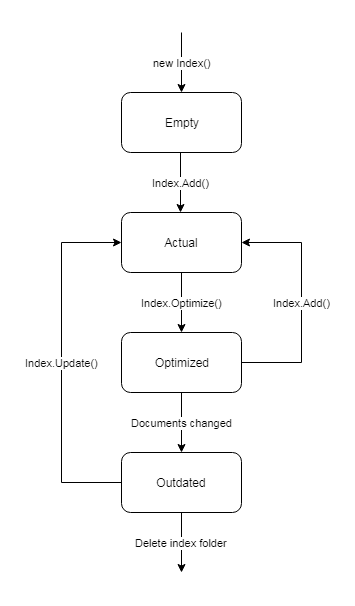
After creation a new index, it is in the Empty state.
When adding documents (method Add) to the index and completing the indexing operation, the index is in the Actual state, the index is ready to process search queries.
To accelerate the processing of search queries, the index can be optimized by calling the Optimize method. Upon completion of the optimization operation, the index goes into the Optimized state. In this state, the index contains the minimum number of segments on the disk and therefore works faster. A very large index is optimized into several segments of limited size, so it may still contain more than one segment. Optimization also physically removes the data of deleted documents from the index.
Changing, adding, deleting documents from indexed folders puts the index in the Outdated state. In this state, search results may not be relevant.
Calling the Update method starts reindexing of changed and new documents and removes deleted documents from the index. Upon completion of the update operation, the index reverts to the Actual state. Deleting documents does not rewrite the index: deleted documents are excluded from search immediately, and their data are physically removed from the disk when the index is optimized.
Here we can give a recommendation to update the index at times of minimal search activity, for example, at night, to give more processor time to search queries handling. But this is not necessary, because searches and index-modifying operations do not block each other: each search works with a snapshot of the index taken when the search starts. Moreover, updating can work without pauses and start immediately after the previous one is completed.
Regarding the addition of documents to an index, it is important to know that at any stage of the existence of an index, new documents can be added (method Add) to it to expand the search base.
The following operations are also part of the index life cycle:
- Version update. When GroupDocs.Search is upgraded to a version with a new index format, an index created by a previous version cannot be opened until it is updated with the IndexUpdater class. The updated index is written to a new folder; the source index is not modified. See Index format and compatibility and Update index version.
- Integrity check. Index data are protected with checksums. The CheckSegments method checks the index for damaged segments and can restore the index functionality if damage is found. See Checking index integrity.
To learn more about search features and get familiar how to enhance your search solution, please refer to the advanced usage section.
You may easily run the code from documentation articles and see the features in action in our GitHub examples:
Along with full featured .NET library we provide simple, but powerful free Apps.
You are welcome to search over your PDF, DOC, DOCX, PPT, PPTX, XLS, XLSX and more with our free online Free Online Document Search App.
Was this page helpful?
Any additional feedback you'd like to share with us?
Please tell us how we can improve this page.
Thank you for your feedback!
We value your opinion. Your feedback will help us improve our documentation.


