Working with templates Leave feedback
On this page
A document template is set by the Template class. It contains template items - fields, tables and barcodes. Each item has a unique (in the template bounds) name and an optional page index - the value that represents the index of the page where the template item is located; null if the template item is located on any page.
The document is parsed by the template with the parseByTemplate(Template) method of the Parser class. See Working with data extracted by template for details how to read the result.
The code snippets below use the following imports:
const java = require('java');
const groupdocs = require('@groupdocs/groupdocs.parser');
const {
  Template, TemplateField, TemplateFixedPosition, TemplateRegexPosition, TemplateLinkedPosition,
  TemplateLinkedPositionEdges, TemplateTable, TemplateTableParameters, TemplateTableLayout,
  TemplateBarcode, Rectangle, Point, Size,
} = groupdocs;
const ArrayList = java.import('java.util.ArrayList');
The template field is set by the TemplateField class with the following constructor:
new TemplateField(position, name, pageIndex)
| Parameter | Description |
|---|---|
| position | Defines the way how to find the field on a page. |
| name | A unique template item name. |
| pageIndex | The page index. An integer value that represents the index of the page where the template item is located; null (or omitted) if the template item is located on any page. |
TemplatePosition is an abstract base class. The following classes are used to set template positions:
TemplateFixedPosition. Provides a template field position which is defined by the rectangular area.TemplateRegexPosition. Provides a template field position which uses the regular expression.TemplateLinkedPosition. Provides a template field position which uses the linked field.
This is the simplest way to define the field position. It requires to set a rectangular area on the page that bounds the field value. All the text that is contained (even partially) in the rectangular area will be extracted as a value:
// Create a fixed template field with "Address" name which is bounded by a rectangle at the position (35, 160) and with the size (110, 20)
const templateField = new TemplateField(
  new TemplateFixedPosition(new Rectangle(new Point(35, 160), new Size(110, 20))),
  'Address');
It is recommended to define a rectangular area above (below) the center of the line that is below (above) the selected area, in order to avoid the excessive extraction of the text. For example:
| Template definition | Result |
|---|---|
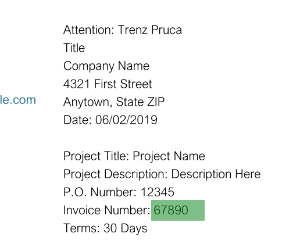 | Extracts only one line: 67890 |
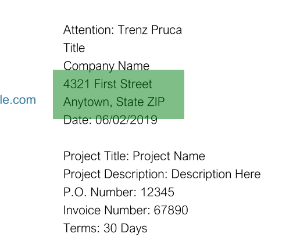 | Extracts two lines: 4321 First Street, Anytown, State ZIP |
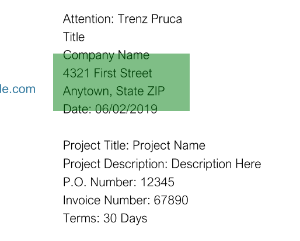 | Extracts four lines: Company Name, 4321 First Street, Anytown, State ZIP, Date: 06/02/2019 |
This way to define the field position allows to find a field value by a regular expression. For example, if the document contains “Invoice Number INV-3337” then the template field can be defined in the following way:
// Create a regex template field with "InvoiceNumber" name
const templateField = new TemplateField(
  new TemplateRegexPosition('Invoice Number\\s+[A-Z0-9\\-]+'),
  'InvoiceNumber');
In this case the entire string is extracted as a value. To extract only a part of the string the regular expression group “value” is used:
// Create a regex template field with "InvoiceNumber" name with "value" group
const templateField = new TemplateField(
  new TemplateRegexPosition('Invoice Number\\s+(?<value>[A-Z0-9\\-]+)'),
  'InvoiceNumber');
In this case “INV-3337” string is extracted as a value.
The regular expression is passed to Java as a string, so backslashes must be escaped in JavaScript string literals ('\\s'), or use String.raw.
Regular expression fields can be used as linked fields.
This way to define the field position allows to find a field value by extracting a rectangular area around the linked field. For example, if it’s known that the field with an invoice number is placed on the right of “Invoice Number” string the following code is used:
// Create a regex template field to find "Invoice Number" text
const invoice = new TemplateField(new TemplateRegexPosition('Invoice Number'), 'Invoice');
// Create a related template field associated with "Invoice" field and extract the value on the right of it
const invoiceNumber = new TemplateField(
  new TemplateLinkedPosition('Invoice', new Size(100, 15), new TemplateLinkedPositionEdges(false, false, true, false)),
  'InvoiceNumber');
| Template definition | Result |
|---|---|
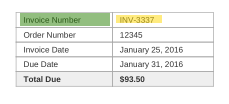 | Extracts a text on the right of “Invoice Number” field: INV-3337 |
To simplify the setting of the size of the template field, the autoScale parameter (the fourth parameter of the TemplateLinkedPosition constructor) is used. The size of the template field is scaled according to the related field if autoScale is set to true. This is useful when the font size is not known in advance, but the proportions of the size of the value (the ratio of height to width) are approximately known:
// Create a regex template field to find "Invoice Number" text
const invoice = new TemplateField(new TemplateRegexPosition('Invoice Number'), 'Invoice');
// Create a related template field associated with "Invoice" field and extract the value on the right of it
const invoiceNumber = new TemplateField(
  new TemplateLinkedPosition('Invoice', new Size(100, 15), new TemplateLinkedPositionEdges(false, false, true, false), true),
  'InvoiceNumber');
| Template definition | Result |
|---|---|
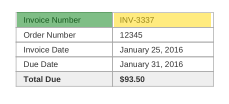 | Extracts a text on the right of “Invoice Number” field. The search area is scaled according to the size of the linked field. |
The field value can be extracted from either side of the related field. The side of the value extraction is set by the TemplateLinkedPositionEdges(left, top, right, bottom) object (getEdges()). The size of the rectangular area is set by the getSearchArea() property. The position of the rectangular area depends on the side of the value extraction:
Left: (LinkedField.Rectangle.Left - SearchAreaSize.Width; LinkedField.Rectangle.Top)
Top: (LinkedField.Rectangle.Left; LinkedField.Rectangle.Top - SearchAreaSize.Height)
Right: (LinkedField.Rectangle.Right; LinkedField.Rectangle.Top)
Bottom: (LinkedField.Rectangle.Left; LinkedField.Rectangle.Bottom)
The related field can be any field which was previously defined in the template:
// Create a regex template field
const fromField = new TemplateField(new TemplateRegexPosition('From'), 'From', 0);
// Create a related template field linked to "From" regex field and placed under it
const companyField = new TemplateField(
  new TemplateLinkedPosition('From', new Size(100, 10), new TemplateLinkedPositionEdges(false, false, false, true)),
  'FromCompany',
  0);
// Create a related template field linked to "FromCompany" related field and placed under it
const addressField = new TemplateField(
  new TemplateLinkedPosition('FromCompany', new Size(100, 30), new TemplateLinkedPositionEdges(false, false, false, true)),
  'FromAddress',
  0);
| Template definition | Result |
|---|---|
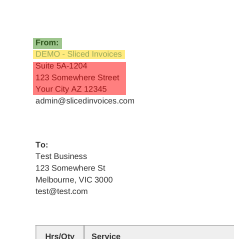 | The extraction is processed in the following way: extracts data of “From” regex field (green), extracts data of “FromCompany” related field (yellow), extracts data of “FromAddress” related field (red). |
A value of the field depends on the related field. The field is always empty if the related field doesn’t have a value. If the field has a value then it has a link to the related field.
An instance of the Template class is created by the constructor which accepts a Java collection of template items (java.lang.Iterable<TemplateItem>). Use java.util.ArrayList:
// Create a collection of template fields
const fields = new ArrayList();
fields.add(new TemplateField(new TemplateRegexPosition('From'), 'From', 0));
fields.add(new TemplateField(
  new TemplateLinkedPosition('From', new Size(100, 10), new TemplateLinkedPositionEdges(false, false, false, true)),
  'FromCompany',
  0));
fields.add(new TemplateField(
  new TemplateLinkedPosition('FromCompany', new Size(100, 30), new TemplateLinkedPositionEdges(false, false, false, true)),
  'FromAddress',
  0));
// Create a document template
const template = new Template(fields);
The field name is case-insensitive (Field and FIELD - the same names) and must be unique in the template. The related field must be associated with an earlier defined field. If these conditions aren’t met, an exception is thrown.
A template table is set by the TemplateTable class with the following constructors:
new TemplateTable(layout, name, pageIndex)      // layout is TemplateTableLayout
new TemplateTable(parameters, name, pageIndex)  // parameters is TemplateTableParameters
A template table can be set by detector parameters or by table layout. If the page index is null, tables are extracted from every document page. It’s useful in the cases when the document contains pages with the same layout (pages differ only by data).
The TemplateTableParameters class has the following constructors:
new TemplateTableParameters(rectangle, verticalSeparators)
new TemplateTableParameters(rectangle, verticalSeparators, hasMergedCells, minRowCount, minColumnCount, minVerticalSpace)
Each of the parameters is optional (pass null). The easiest way to define a table is to set the rectangular area of the table and column separators. The separators are a Java collection of java.lang.Double values: create the values with java.newDouble, because integral JavaScript numbers are passed to Java as java.lang.Integer:
// Helper which converts a JavaScript array of numbers to a Java list of doubles
function toDoubleList(values) {
  const list = new ArrayList();
  values.forEach((v) => list.add(java.newDouble(v)));
  return list;
}

const parameters = new TemplateTableParameters(
  new Rectangle(new Point(175, 350), new Size(400, 200)),
  toDoubleList([185, 370, 425, 485, 545]));
If a template table is set by detector parameters, the table is detected automatically:
const parameters = new TemplateTableParameters(
  new Rectangle(new Point(175, 350), new Size(400, 200)),
  toDoubleList([185, 370, 425, 485, 545]));

const table = new TemplateTable(parameters, 'Details', 0);

// Create a document template
const items = new ArrayList();
items.add(table);
const template = new Template(items);
A template table is set by table layout if the table can’t be detected automatically:
const layout = new TemplateTableLayout(
  toDoubleList([50, 95, 275]),
  toDoubleList([325, 340, 365]));

const table = new TemplateTable(layout, 'Details', null);
const items = new ArrayList();
items.add(table);
const template = new Template(items);
These collections represent bounds of columns and rows. For example, for a 2x2 table there are 3 vertical and 3 horizontal separators:
---------
|   |   |
---------
|   |   |
---------
The moveTo(Point) method is used to move the table layout.
For example, a document has tables on each page (or a set of documents with a table on the page). These tables differ by position and content, but have the same columns and rows. In this case a user can define a TemplateTableLayout object at (0, 0) once and then move it to the location of the definite table.
If the table position depends on another object of the page, a user can define a TemplateTableLayout object based on the template document and then move it according to an anchor object. For example, if this is a summary table and it is followed by a details table (which can contain a different count of rows). In this case a user can define a TemplateTableLayout object on the template document (with the known details table rectangle) and then move the TemplateTableLayout object according to the difference of the details table rectangle of the template and the real document.
The moveTo(Point) method returns a copy of the current object. A user can pass any coordinates (even negative - then the layout will be moved to the left/top):
// Move the layout to the position (100, 100)
const movedLayout = layout.moveTo(new Point(100, 100));
Template barcodes work in the same way as a template field with the fixed position. The following example shows how to define a template barcode field and parse the document:
const java = require('java');
const groupdocs = require('@groupdocs/groupdocs.parser');
const ArrayList = java.import('java.util.ArrayList');

// Define a barcode field
const barcode = new groupdocs.TemplateBarcode(
  new groupdocs.Rectangle(new groupdocs.Point(430, 50), new groupdocs.Size(140, 140)),
  'QR');
// Create a template
const items = new ArrayList();
items.add(barcode);
const template = new groupdocs.Template(items);
// Create an instance of Parser class
const parser = new groupdocs.Parser('Barcodes.pdf');
try {
  // Parse the document by the template
  const data = parser.parseByTemplate(template);
  // Print all extracted data
  for (let i = 0; i < data.getCount(); i++) {
    const field = data.get(i);
    // As we have defined only barcode fields in the template,
    // the page area is expected to be PageBarcodeArea
    const area = field.getPageArea();
    const value = java.instanceOf(area, 'com.groupdocs.parser.data.PageBarcodeArea')
      ? area.getValue()
      : 'Not a template barcode field';
    console.log(field.getName() + ': ' + value);
  }
} finally {
  parser.close();
}
process.exit(0);
The barcode field has no page index, so the QR codes of both pages of Barcodes.pdf are extracted:
QR: https://products.groupdocs.com/parser/net/
QR: https://products.groupdocs.com/parser/java/
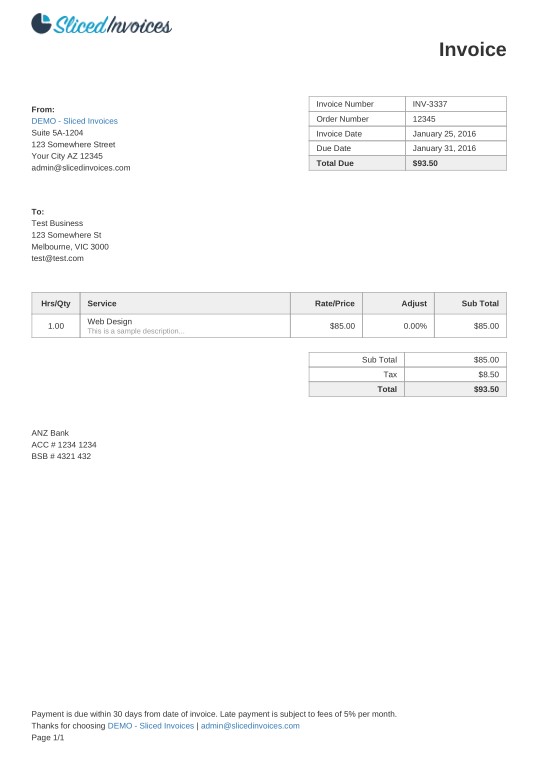
This example shows the template which is used to parse the following invoice:
const java = require('java');
const groupdocs = require('@groupdocs/groupdocs.parser');
const {
  Parser, Template, TemplateField, TemplateFixedPosition, TemplateRegexPosition, TemplateLinkedPosition,
  TemplateLinkedPositionEdges, TemplateTable, TemplateTableParameters, Rectangle, Point, Size,
} = groupdocs;
const ArrayList = java.import('java.util.ArrayList');

// Create a field with the fixed position
const fixedField = (x, y, width, height, name) => new TemplateField(
  new TemplateFixedPosition(new Rectangle(new Point(x, y), new Size(width, height))),
  name);
// Create a field which is placed on the right of the linked field
const rightOf = (linkedName, name) => new TemplateField(
  new TemplateLinkedPosition(linkedName, new Size(200, 15), new TemplateLinkedPositionEdges(false, false, true, false)),
  name);

// Create detector parameters for "Details" table
const detailsTableParameters = new TemplateTableParameters(new Rectangle(new Point(35, 320), new Size(530, 55)), null);
// Create detector parameters for "Summary" table
const summaryTableParameters = new TemplateTableParameters(new Rectangle(new Point(330, 385), new Size(220, 65)), null);

// Create a collection of template items
const templateItems = new ArrayList();
[
  fixedField(35, 135, 100, 10, 'FromCompany'),
  fixedField(35, 150, 100, 35, 'FromAddress'),
  fixedField(35, 190, 150, 2, 'FromEmail'),
  fixedField(35, 250, 100, 2, 'ToCompany'),
  fixedField(35, 260, 100, 15, 'ToAddress'),
  fixedField(35, 290, 150, 2, 'ToEmail'),
  new TemplateField(new TemplateRegexPosition('Invoice Number'), 'InvoiceNumber'),
  rightOf('InvoiceNumber', 'InvoiceNumberValue'),
  new TemplateField(new TemplateRegexPosition('Order Number'), 'InvoiceOrder'),
  rightOf('InvoiceOrder', 'InvoiceOrderValue'),
  new TemplateField(new TemplateRegexPosition('Invoice Date'), 'InvoiceDate'),
  rightOf('InvoiceDate', 'InvoiceDateValue'),
  new TemplateField(new TemplateRegexPosition('Due Date'), 'DueDate'),
  rightOf('DueDate', 'DueDateValue'),
  new TemplateField(new TemplateRegexPosition('Total Due'), 'TotalDue'),
  rightOf('TotalDue', 'TotalDueValue'),
  new TemplateTable(detailsTableParameters, 'details', null),
  new TemplateTable(summaryTableParameters, 'summary', null),
].forEach((item) => templateItems.add(item));

// Create a document template
const template = new Template(templateItems);

// Parse the invoice by the template
const parser = new Parser('invoice.pdf');
try {
  const data = parser.parseByTemplate(template);
  for (let i = 0; i < data.getCount(); i++) {
    const field = data.get(i);
    const area = field.getPageArea();
    if (java.instanceOf(area, 'com.groupdocs.parser.data.PageTextArea')) {
      console.log(field.getName() + ': ' + area.getText());
    } else if (java.instanceOf(area, 'com.groupdocs.parser.data.PageTableArea')) {
      console.log(field.getName() + ': table ' + area.getRowCount() + 'x' + area.getColumnCount());
    }
  }
} finally {
  parser.close();
}
process.exit(0);
The beginning of the output for invoice.pdf (the parser returns field names in upper case):
FROMCOMPANY: DEMO - Sliced Invoices
FROMADDRESS: Suite 5A-1204
123 Somewhere Street
Your City AZ 12345
FROMEMAIL: admin@slicedinvoices.com
TOCOMPANY: Test Business
...
INVOICENUMBERVALUE: INV-3337
...
TOTALDUEVALUE: $93.50
DETAILS: table 2x5
SUMMARY: table 3x2
Along with the full-featured library we provide simple but powerful free Apps.
You are welcome to parse documents and extract data from PDF, DOC, DOCX, PPT, PPTX, XLS, XLSX, Emails and more with our Free Online Document Parser App.
Was this page helpful?
Any additional feedback you'd like to share with us?
Please tell us how we can improve this page.
Thank you for your feedback!
We value your opinion. Your feedback will help us improve our documentation.


