Extract text structure Leave feedback
On this page
GroupDocs.Parser provides the functionality to extract the text structure from documents by the getStructure method:
parser.getStructure(); // returns an org.w3c.dom.Document object or null
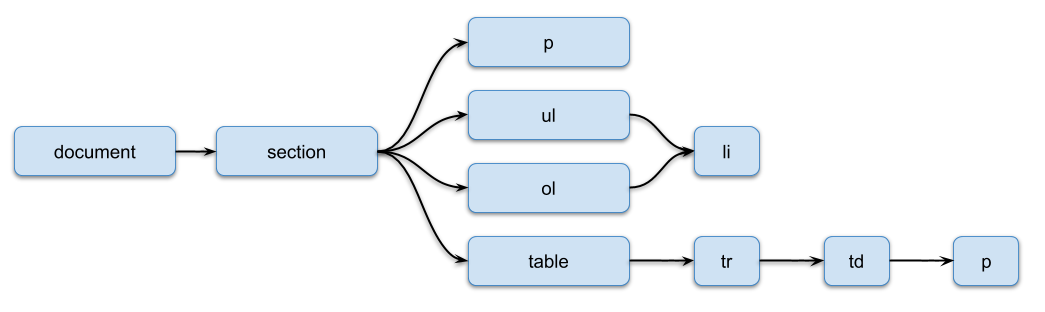
This method returns the XML representation of a document as a Java org.w3c.dom.Document object. You work with it through the standard Java DOM methods (getDocumentElement(), getChildNodes(), getNodeName(), getAttributes() and so on). A document has the following structure:
| Tag | Description |
|---|---|
| document | The root tag |
| section | Represents a section of the document. Depending on the document type, it can represent a worksheet, a slide and so on. Can contain the following attributes:
|
| p | Represents a text paragraph. Can contain the following attribute:
|
| ul | Represents an unordered list |
| ol | Represents an ordered list |
| li | Represents a list item |
| shape | Represents a shape object. |
| table | Represents a table |
| tr | Represents a table row |
| td | Represents a table cell. Can contain the following attributes:
|
Tags have the following relations:
- document tag can contain any number of section tags
- section tag can contain any number of p, ul, ol or table tags in any sequence
- table tag can contain any number of tr tags
- tr tag can contain any number of td tags
- td tag can contain one p tag
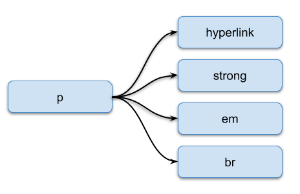
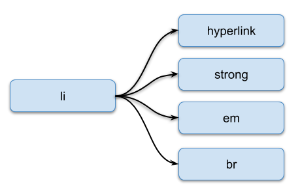
The p and li tags can contain hyperlink, strong, em tags and the value that represents a text:
| Tag | Description |
|---|---|
| hyperlink | Represents a hyperlink. Can contain the following attribute:
|
| strong | Represents a strong emphasis (bold text) |
| em | Represents a regular emphasis (italic text) |
| br | Represents a line break (empty tag) |
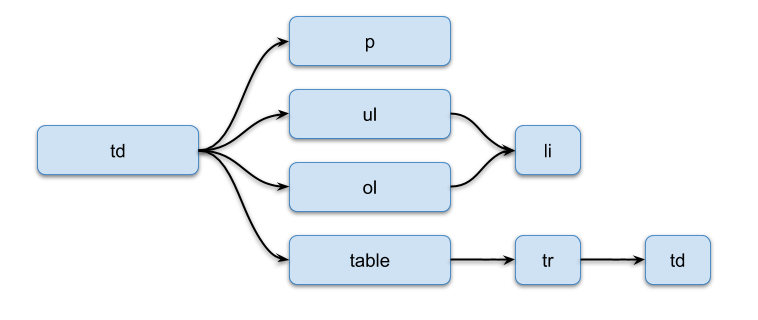
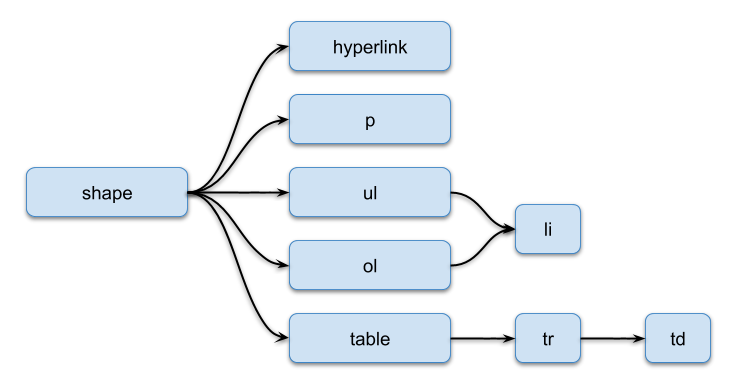
Word processing documents have a more complex table cell, and a paragraph can contain any number of shapes.
A table cell can contain any number of paragraphs, lists and tables:
A shape can contain a single hyperlink (empty tag) for the entire shape and any number of paragraphs, lists or tables:
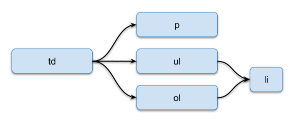
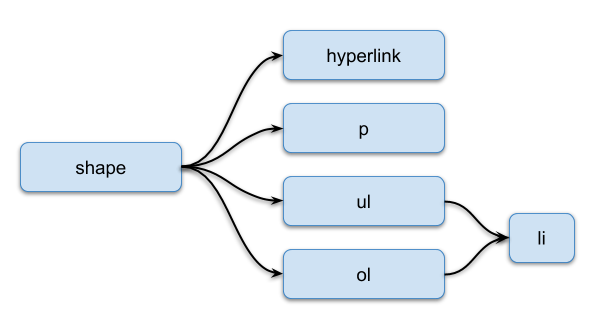
Presentations have a more complex table cell, and a section can contain any number of shapes.
A table cell can contain any number of paragraphs or lists:
A shape can contain a single hyperlink (empty tag) for the entire shape and any number of paragraphs or lists:
Spreadsheets have the following document structure:
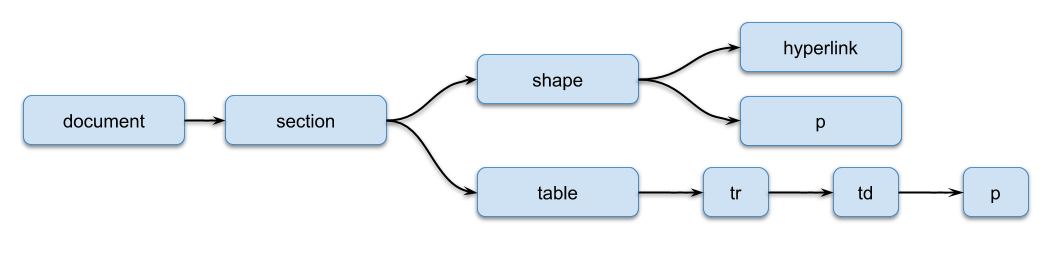
It’s simpler than the others. A section can contain any number of shapes and only one table. A shape can contain a single hyperlink (empty tag) for the entire shape and any number of paragraphs.
Here are the steps to extract hyperlinks from the document:
- Instantiate the
Parserobject for the initial document; - Call the
getStructuremethod and obtain theorg.w3c.dom.Documentobject; - Check if
documentisn’tnull(text structure extraction is supported for the document); - Process the XML document.
The following example shows how to extract hyperlinks from the document:
const groupdocs = require('@groupdocs/groupdocs.parser');

// Recursively print the "link" attribute of all hyperlink nodes
function readNode(node) {
  const nodes = node.getChildNodes();
  for (let i = 0; i < nodes.getLength(); i++) {
    const n = nodes.item(i);
    if (n.getNodeName().toLowerCase() === 'hyperlink') {
      const a = n.getAttributes().getNamedItem('link');
      if (a != null) {
        console.log(a.getNodeValue());
      }
    }
    if (n.hasChildNodes()) {
      readNode(n);
    }
  }
}

// Create an instance of Parser class
const parser = new groupdocs.Parser('Hyperlinks.docx');
try {
  // Extract text structure as an XML document (org.w3c.dom.Document)
  const document = parser.getStructure();
  // Check if text structure extraction is supported
  if (document == null) {
    console.log("Text structure extraction isn't supported.");
  } else {
    // Read XML document
    readNode(document.getDocumentElement());
  }
} finally {
  parser.close();
}
process.exit(0);
The following document:
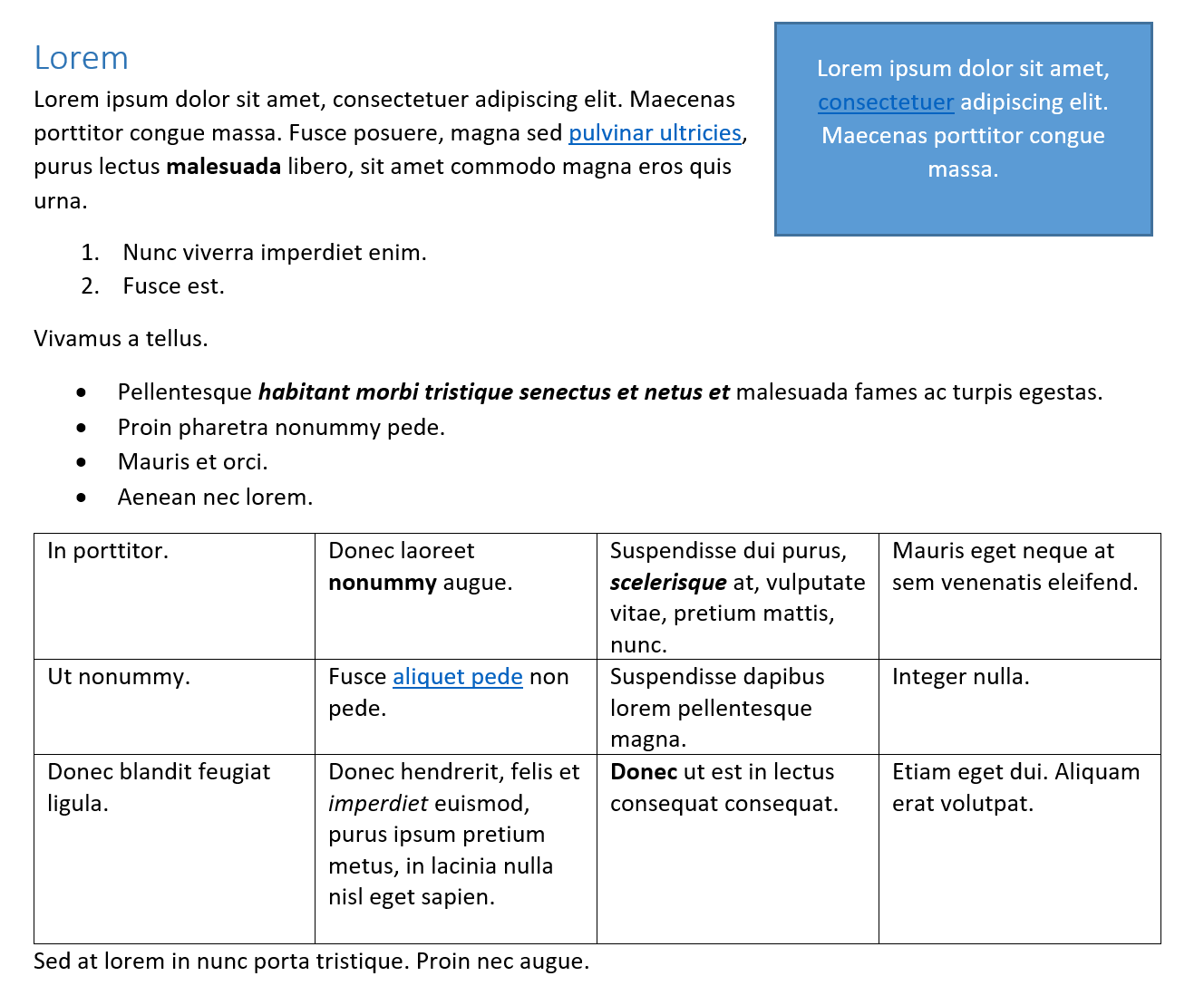
has the following text structure:
<?xml version="1.0"?>
<document>
  <section>
    <p style="HEADING1">
      <shape>
        <p style="HEADING1">
          Lorem ipsum dolor sit amet, <hyperlink link="google.com">consectetuer</hyperlink> adipiscing elit. Maecenas porttitor congue massa.
        </p>
      </shape>Lorem
    </p>
    <p>
      Lorem ipsum dolor sit amet, consectetuer adipiscing elit. Maecenas porttitor congue massa. Fusce posuere, magna sed <hyperlink link="bing.com">pulvinar ultricies</hyperlink>, purus lectus <strong>malesuada</strong> libero, sit amet commodo magna eros quis urna.
    </p>
    <ol>
      <li>Nunc viverra imperdiet enim. </li>
      <li>Fusce est.</li>
    </ol>
    <p>Vivamus a tellus. </p>
    <ul>
      <li>
        Pellentesque <em>
          <strong>habitant morbi tristique senectus et netus et</strong>
        </em> malesuada fames ac turpis egestas.
      </li>
      <li>Proin pharetra nonummy pede. </li>
      <li>Mauris et orci. </li>
      <li>Aenean nec lorem.</li>
    </ul>
    <table>
      <tr>
        <td rowIndex="0" columnIndex="0" rowSpan="1" columnSpan="1">
          <p>In porttitor.</p>
        </td>
        <td rowIndex="0" columnIndex="1" rowSpan="1" columnSpan="1">
          <p>
            Donec laoreet <strong>nonummy</strong> augue.
          </p>
        </td>
        <td rowIndex="0" columnIndex="2" rowSpan="1" columnSpan="1">
          <p>
            Suspendisse dui purus, <em>
              <strong>scelerisque</strong>
            </em> at, vulputate vitae, pretium mattis, nunc.
          </p>
        </td>
        <td rowIndex="0" columnIndex="3" rowSpan="1" columnSpan="1">
          <p>Mauris eget neque at sem venenatis eleifend. </p>
        </td>
      </tr>
      <tr>
        <td rowIndex="1" columnIndex="0" rowSpan="1" columnSpan="1">
          <p>Ut nonummy.</p>
        </td>
        <td rowIndex="1" columnIndex="1" rowSpan="1" columnSpan="1">
          <p>
            Fusce <hyperlink link="google.com">aliquet pede</hyperlink> non pede.
          </p>
        </td>
        <td rowIndex="1" columnIndex="2" rowSpan="1" columnSpan="1">
          <p>Suspendisse dapibus lorem pellentesque magna.</p>
        </td>
        <td rowIndex="1" columnIndex="3" rowSpan="1" columnSpan="1">
          <p>Integer nulla.</p>
        </td>
      </tr>
      <tr>
        <td rowIndex="2" columnIndex="0" rowSpan="3" columnSpan="1">
          <p>Donec blandit feugiat ligula.</p>
        </td>
        <td rowIndex="4" columnIndex="1" rowSpan="1" columnSpan="1">
          <p>
            Donec hendrerit, felis et <em>imperdiet</em> euismod, purus ipsum pretium metus, in lacinia nulla nisl eget sapien.
          </p>
        </td>
        <td rowIndex="2" columnIndex="2" rowSpan="3" columnSpan="1">
          <p>
            <strong>Donec</strong> ut est in lectus consequat consequat.
          </p>
        </td>
        <td rowIndex="2" columnIndex="3" rowSpan="3" columnSpan="1">
          <p>Etiam eget dui. Aliquam erat volutpat.</p>
        </td>
      </tr>
    </table>
    <p>Sed at lorem in nunc porta tristique. Proin nec augue.</p>
  </section>
</document>
Along with the full-featured library we provide simple but powerful free apps.
You are welcome to extract data from PDF, DOC, DOCX, PPT, PPTX, XLS, XLSX, Emails and more with our Free Online Document Parser App.
Was this page helpful?
Any additional feedback you'd like to share with us?
Please tell us how we can improve this page.
Thank you for your feedback!
We value your opinion. Your feedback will help us improve our documentation.


