Word document comparison options Leave feedback
On this page
GroupDocs.Comparison provides the WordCompareOptions class for configuring comparison of Word documents (.doc, .docx, .rtf, and other word-processing formats). It extends CompareOptions and adds Word-specific properties — most notably the DisplayMode property, which controls how detected changes are written into the result document.
The setDisplayMode() method accepts one of two values from the WordCompareOptions.ComparisonDisplayMode enumeration:
- REVISIONS (default) — changes are emitted as native Word revision (track-changes) markup. The result opens in Microsoft Word with the Review → Accept / Reject controls ready.
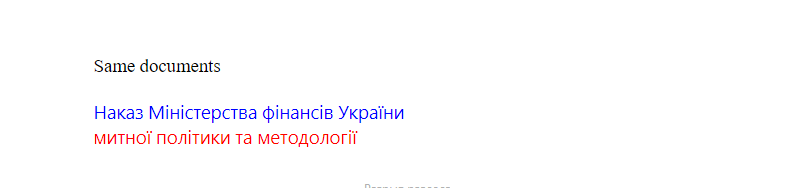
- HIGHLIGHT — inserted, deleted, and modified text is rendered with inline colour highlights directly in the document body. No track-changes metadata is added.
NoteA plainCompareOptionsobject keeps producing highlighted output, as before. Track-changes output is the default only when you pass aWordCompareOptionsobject.
import com.groupdocs.comparison.Comparer;
import com.groupdocs.comparison.options.WordCompareOptions;
// ...

try (Comparer comparer = new Comparer("source.docx")) {
    comparer.add("target.docx");

    WordCompareOptions options = new WordCompareOptions();
    options.setDisplayMode(WordCompareOptions.ComparisonDisplayMode.REVISIONS);

    comparer.compare("result.docx", options);
}
The result:
| Revisions mode |
|---|
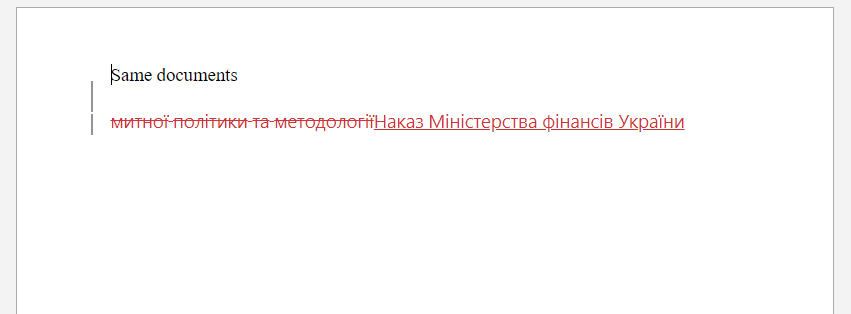 |
In this mode the changes live in the result document as Word revisions, so Comparer.getChanges() is not available after the comparison. Use HIGHLIGHT mode when you need the list of changes from the API.
import com.groupdocs.comparison.Comparer;
import com.groupdocs.comparison.options.WordCompareOptions;
// ...

try (Comparer comparer = new Comparer("source.docx")) {
    comparer.add("target.docx");

    WordCompareOptions options = new WordCompareOptions();
    options.setDisplayMode(WordCompareOptions.ComparisonDisplayMode.HIGHLIGHT);

    comparer.compare("result.docx", options);
}
The result:
| Highlight mode |
|---|
 |
Call setDetectStyleChanges(true) to include formatting differences (bold, font size, colour, etc.) alongside textual edits.
try (Comparer comparer = new Comparer("source.docx")) {
    comparer.add("target.docx");

    WordCompareOptions options = new WordCompareOptions();
    options.setDisplayMode(WordCompareOptions.ComparisonDisplayMode.REVISIONS);
    options.setDetectStyleChanges(true);

    comparer.compare("result.docx", options);
}
Call setHeaderFootersComparison(true) to include header and footer content in the comparison.
try (Comparer comparer = new Comparer("source.docx")) {
    comparer.add("target.docx");

    WordCompareOptions options = new WordCompareOptions();
    options.setHeaderFootersComparison(true);

    comparer.compare("result.docx", options);
}
Call setMarkLineBreaks(true) to visually mark paragraph (line) breaks that differ between documents.
try (Comparer comparer = new Comparer("source.docx")) {
    comparer.add("target.docx");

    WordCompareOptions options = new WordCompareOptions();
    options.setMarkLineBreaks(true);

    comparer.compare("result.docx", options);
}
The properties below are also available on WordCompareOptions. Several of them are documented in dedicated articles — follow the links for details:
- setCompareBookmarks() — compare bookmarks in the source and target documents. See Compare bookmarks in Word documents.
- setCompareVariableProperty() — compare document variable properties (e.g.
DOCVARIABLEfields). See Compare document properties and variables. - setCompareDocumentProperty() — compare built-in and custom document properties. See Compare document properties and variables.
- setRevisionAuthorName() — author name stamped on revisions when the display mode is
REVISIONS. See Setting author of changes. - setShowRevisions() — controls whether revision markup remains visible in the result. See Show Revisions.
- setLeaveGaps() — leave empty lines in place of inserted or deleted content to preserve layout. See Show gap lines.
All CompareOptions base properties — InsertedItemStyle, DeletedItemStyle, ChangedItemStyle, SensitivityOfComparison, GenerateSummaryPage, and others — are also available on WordCompareOptions.
NoteThe Word-specific setters onCompareOptions(setWordTrackChanges(),setCompareBookmarks(),setRevisionAuthorName(), and others) are deprecated. They keep working for backward compatibility, but new code should useWordCompareOptions. On aWordCompareOptionsobject,setWordTrackChanges(true)is equivalent tosetDisplayMode(REVISIONS)andsetWordTrackChanges(false)tosetDisplayMode(HIGHLIGHT).
- WordCompareOptions API reference
- Compare bookmarks in Word documents
- Show Revisions
- Setting author of changes
Was this page helpful?
Any additional feedback you'd like to share with us?
Please tell us how we can improve this page.
Thank you for your feedback!
We value your opinion. Your feedback will help us improve our documentation.


