Set shape color independently of font color Leave feedback
On this page
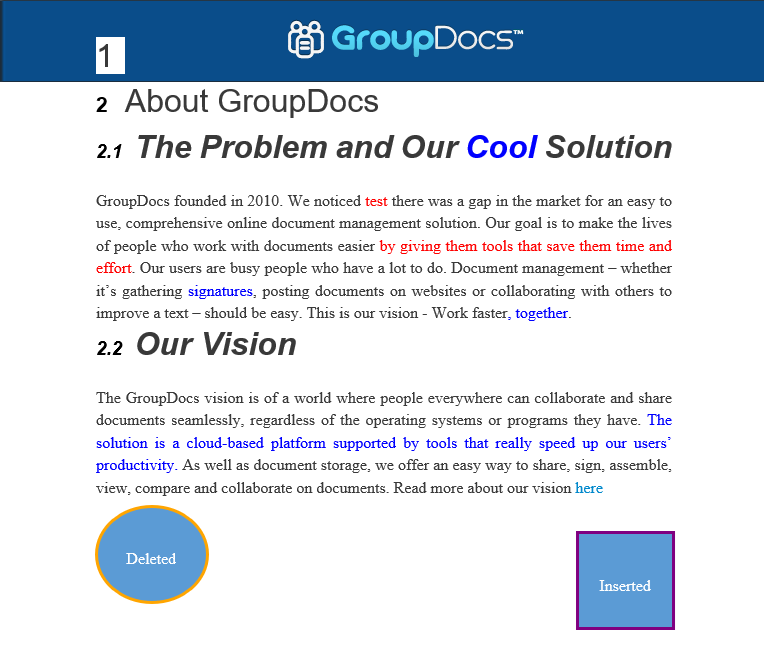
GroupDocs.Comparison provides the option to specify the color for changed shapes.
To compare two documents with custom change color for shapes, follow these steps:
- Instantiate the Comparer object. Specify the source document path or stream.
- Call the add() method. Specify the target document path or stream.
- Instantiate the CompareOptions object. Specify the ShapeColor for the InsertedItemStyle/DeletedItemStyle/ChangedItemStyle parameters.
- Set MarkChangedContent to
true. - Call the compare() method. Specify the CompareOptions object.
The following code snippets show how to compare documents with specific color options for shapes:
import com.groupdocs.comparison.Comparer;
import com.groupdocs.comparison.options.CompareOptions;
import com.groupdocs.comparison.options.style.StyleSettings;
import java.awt.Color;
// ...

try (Comparer comparer = new Comparer("source.docx")) {
    comparer.add("target.docx");

    CompareOptions compareOptions = new CompareOptions();
    compareOptions.setDetectStyleChanges(true);
    compareOptions.setMarkChangedContent(true);

    final StyleSettings insertedStyleSettings = new StyleSettings();
    insertedStyleSettings.setFontColor(Color.BLUE);
    insertedStyleSettings.setShapeColor(new Color(128, 0, 128)); // purple
    compareOptions.setInsertedItemStyle(insertedStyleSettings);

    final StyleSettings deletedStyleSettings = new StyleSettings();
    deletedStyleSettings.setFontColor(Color.RED);
    deletedStyleSettings.setShapeColor(Color.ORANGE);
    compareOptions.setDeletedItemStyle(deletedStyleSettings);

    final StyleSettings changedStyleSettings = new StyleSettings();
    changedStyleSettings.setFontColor(Color.GREEN);
    changedStyleSettings.setShapeColor(new Color(144, 238, 144)); // light green
    compareOptions.setChangedItemStyle(changedStyleSettings);

    comparer.compare("result.docx", compareOptions);
}
The result is as follows:
Was this page helpful?
Any additional feedback you'd like to share with us?
Please tell us how we can improve this page.
Thank you for your feedback!
We value your opinion. Your feedback will help us improve our documentation.


